

Forgot password is basic functionality which all web/mobile applications has it. In this article we are going to show how to implement this in Node.js express framework. One required thing to implement this is the user should have email address setup when signing up or in your user profile, so email link for forgotten password can be sent.
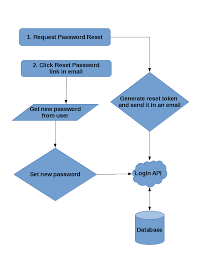
Step 1
The user is taken to the reset password page where he is required to enter his email address. Once the email address is entered,a request is sent to the backend (node.js) to validate if this email address exists in any user profile.
For this to achieve we create a controller file say user.js which processes the reset-password request
user.js
1userRoutes.post('/reset-password', function (req, res) {2 const email = req.body.email3 User4 .findOne({5 where: { email: email },//checking if the email address sent by client is present in the db(valid)6 })7 .then(function (user) {8 if (!user) {9 return throwFailed(res, 'No user found with that email address.')10 }11 ResetPassword12 .findOne({13 where: { userId: user.id, status: 0 },14 }).then(function (resetPassword) {15 if (resetPassword)16 resetPassword.destroy({17 where: {18 id: resetPassword.id19 }20 })21 token = crypto.randomBytes(32).toString('hex')//creating the token to be sent to the forgot password form (react)22 bcrypt.hash(token, null, null, function (err, hash) {//hashing the password to store in the db node.js23 ResetPassword.create({24 userId: user.id,25 resetPasswordToken: hash,26 expire: moment.utc().add(config.tokenExpiry, 'seconds'),27 }).then(function (item) {28 if (!item)29 return throwFailed(res, 'Oops problem in creating new password record')30 let mailOptions = {31 from: '"<jyothi pitta>" jyothi.pitta@ktree.us',32 to: user.email,33 subject: 'Reset your account password',34 html: '<h4><b>Reset Password</b></h4>' +35 '<p>To reset your password, complete this form:</p>' +36 '<a href=' + config.clientUrl + 'reset/' + user.id + '/' + token + '">' + config.clientUrl + 'reset/' + user.id + '/' + token + '</a>' +37 '<br><br>' +38 '<p>--Team</p>'39 }40 let mailSent = sendMail(mailOptions)//sending mail to the user where he can reset password.User id and the token generated are sent as params in a link41 if (mailSent) {42 return res.json({ success: true, message: 'Check your mail to reset your password.' })43 } else {44 return throwFailed(error, 'Unable to send email.');45 }46 })47 })48 });49 })50})
Understanding user.js
The email sent from the forgot password page is checked if it is present in the database.
If the email address doesn’t match, a response would be sent stating 'No user found with that email address.'
1userRoutes.post('/reset-password', function (req, res) {2 const email = req.body.email3 User.findOne({ email: email })4 .exec()5 .then(function (user) {6 if (!user) {7 return throwFailed(res, 'No user found with that email address.')8 }
In the below code
- We will create entry in ‘forgotpassword’ table, if the email ID is present in the users table.
- The code also checks and delete if any previous forgot_password entries for this particular user id.
- The new record created in the database consists of the new hashed token and the token generated before hashing is sent in the forgot-password form.
1token = crypto.randomBytes(32).toString('hex')//this token would be sent in the link to reset forgot password2bcrypt.hash(token, null, null, function (err, hash) {3 let password = new ResetPassword({4 userId: user._id,5 resetPasswordToken: hash,6 expire: moment.utc().add(config.tokenExpiry, 'seconds'),7 });8 password.save(function (err) {9 if (err) throw err;10 });11});
Here using the below code an email with a link consisting of a token,user id and expiry time is sent to the user.
1let mailOptions = {2 from: config.senderEmail,3 to: user.email,4 subject: 'Reset your account password',5 html: '<h4><b>Reset Password</b></h4>' +6 '<p>To reset your password, complete this form:</p>' +7 '<a href=' + config.clientUrl + 'reset/' + user._id + '/' + token + '">' + config.clientUrl + 'reset/' + user._id + '/' + token + '</a>' +8 '<br><br>' +9 '<p>--Team</p>'10};11// send mail with defined transport object12transporter.sendMail(mailOptions, (error, info))
Step 2
In this step we will code the part where the user can provide new password. As described in step 1 The link generated for the forgot password uses ‘guestroute’, in this route we will call component ‘NewPasswordContainer’.
1import NewPasswordContainer from '../modules/resetPassword/components/new-password-container'
1<GuestRoute exact path="/reset/:userId/:token" component={NewPasswordContainer} />
NewPasswordContainer.js
1handleValidation(){//validating password and confirm password2 let password = this.state.password3 let confirmPassword = this.state.confirmPassword4 let errors = {};5 let formIsValid = true;6 //validation7 if (!password) {8 formIsValid = false;9 errors["password"] = "Password is required.";10 }11 if (!confirmPassword) {12 formIsValid = false;13 errors["confirmPassword"] = "Confirmation password is required.";14 }15 if (password && confirmPassword) {16 if (password.length < 5) {17 formIsValid = false;18 errors["password"] = "Password minimum lenght is 5.";19 } else if (password !== confirmPassword) {20 formIsValid = false;21 errors["password"] = "The password confirmation does not match.";22 }23 }24 this.setState({ errors: errors })25 return formIsValid;26}
/*On submitting the form we call the onStoreNewPassword method*/
1import * as ResetPasswordAction from '../actions/reset-password-actions'2async onStoreNewPassword(event) {3event.preventDefault();4let userId = this.props.match.params.userId5let resetToken = this.props.match.params.token6if (this.handleValidation()) {7let newPasswordBtnRef = Object.assign({}, this.state.newPasswordBtnRef)8newPasswordBtnRef.current.disabled = true9newPasswordBtnRef.current.innerHTML = "Loading..."10this.setState({ newPasswordBtnRef })11var response = await ResetPasswordAction.storeNewPassword(this.state.password, userId, resetToken)//calling an action to send data to the node.js store-password api12if (response) {13newPasswordBtnRef.current.disabled = false14newPasswordBtnRef.current.innerHTML = "Reset Password"15this.setState({ newPasswordBtnRef })16appHistory.push('/login')17}18}19}
reset-password-actions.js
1/*Store-password function */2export function storeNewPassword(password, userId, token) {3 store.dispatch(showLoading())4 return request.post('store-password', {//node.js api to send the new password to5 userId: userId,6 password: password,7 token: token8 }).then(response => {9 store.dispatch(hideLoading())10 if (response.data.success) {11 notification.success(response.data.message)12 return true;13 } else {14 notification.error(response.data.message)15 }16 }).catch(error => {17 console.log(error)18 })19}
Decoding NewPasswordContainer.js line by line
The NewPasswordContainer.js file validates the password and the confirm password
1handleValidation(){//validating password and confirm password2 let password = this.state.password
Once the user clicks on submit we invoke the onStoreNewPassword which takes the user id and token to the node.js to update the password using an action
1async onStoreNewPassword(event) {2 event.preventDefault();3 let userId = this.props.match.params.userId4 let resetToken = this.props.match.params.token5 if (this.handleValidation()) {
1var response = await ResetPasswordAction.storeNewPassword(this.state.password, userId, resetToken)//action called
The storeNewPassword function sends the token and the user id to update the password in node.js
1 return request.post('store-password', {//node.js api to send the new password to
Step 3
On clicking submit in the forgot password page the hashed token in the db is verified against the one in the forgot password form to validate if the token is still valid and hasn't expired. If both tokens match a new password would be updated in the users record by encrypting the password.
1userRoutes.post('/store-password', function (req, res) {//handles the new password from react2 const userId = req.body.userId3 const token = req.body.token4 const password = req.body.password5 ResetPassword.findOne({ where: { userId: userId, status: 0 } })6 .then(function (resetPassword) {7 if (!resetPassword) {8 return throwFailed(res, 'Invalid or expired reset token.')9 }10 bcrypt.compare(token, resetPassword.token, function (errBcrypt, resBcrypt) {// the token and the hashed token in the db are verified befor updating the password11 let expireTime = moment.utc(resetPassword.expire)12 let currentTime = new Date();13 bcrypt.hash(password, null, null, function (err, hash) {14 User.update({15 password: hash,16 },17 { where: { id: userId } }18 ).19 then(() => {20 ResetPassword.update({21 status: 122 }, { where: { id: resetPassword.id } }).23 then((msg) => {24 if (!msg)25 throw err26 else27 res.json({ success: true, message: 'Password Updated successfully.' })28 })29 })30 });31 });32 }).catch(error => throwFailed(error, ''))33})
Step 4
Once the new password is updated successfully, the user is redirected to the login page where he can use his new password for login.
onStoreNewPassword function in step2.
1if (response) {2 newPasswordBtnRef.current.disabled = false3 newPasswordBtnRef.current.innerHTML = "Reset Password"4 this.setState({ newPasswordBtnRef })5 appHistory.push('/login') //navigating the login page6}


